@Newswriters Still work in progress. Please edit this post to improve it before we move this to the blog.
Hello AmpModders!
As we prepare for AmpMod’s first anniversary, we are releasing a new version of AmpMod. This update adds a few useful features. Most of these features were intended to be in 0.3 - sorry for the wait!
Switch and case
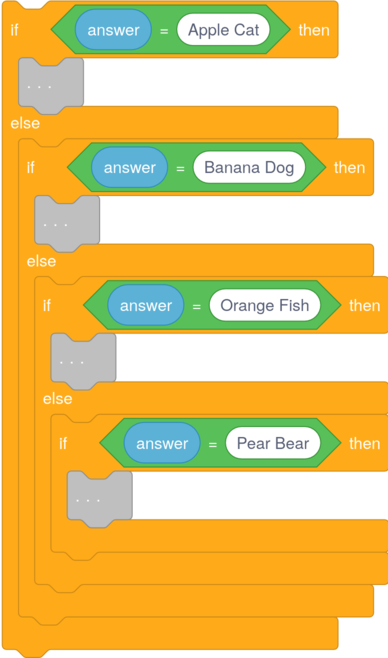
In Scratch, you will often need to use several "if then else" blocks just to check what the player typed into your project out of 100 valid options. This lags the editor a lot and causes spaghetti code!
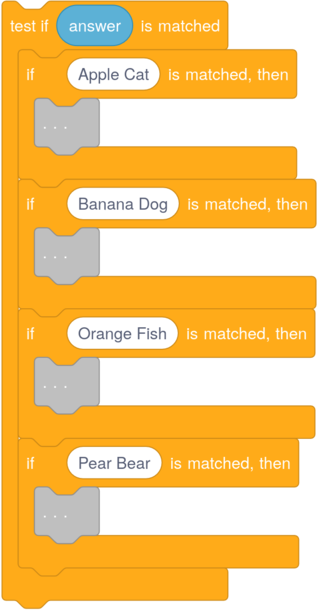
In programming languages such as JavaScript, switch and case allow you to check if one value matches another. Even though JavaScript also lets you use "else if", using switch and case makes it more obvious what you're doing.
This is where AmpMod 0.4's new switch and case blocks come in. It lets you write logic like this:
in a much more readable format like this:
More control blocks
There are now more control blocks, like test if () is matched, if () was matched, then, if no match was found, then, break out of sub-stack, throw error () are the new control blocks.
Error throwing
You can now throw errors in AmpMod using the throw error () block. Try and catch will be added when we figure that out in the compiler.
Other new features
- The UI is now more rounded
- "string from () with delimiter ()" block added
- Updating Program Settings no longer stores a comment. Instead, project settings are stored directly within the project data
- Groundwork has been laid for translations - some languages will hopefully be translated in 0.5
- You can now navigate the context menus using arrow keys - keyboard navigation will be added to the menu bar at a later time
- On Firefox, the direction picker popover no longer slowly loads
Thanks for using AmpMod, and see you in the next update!